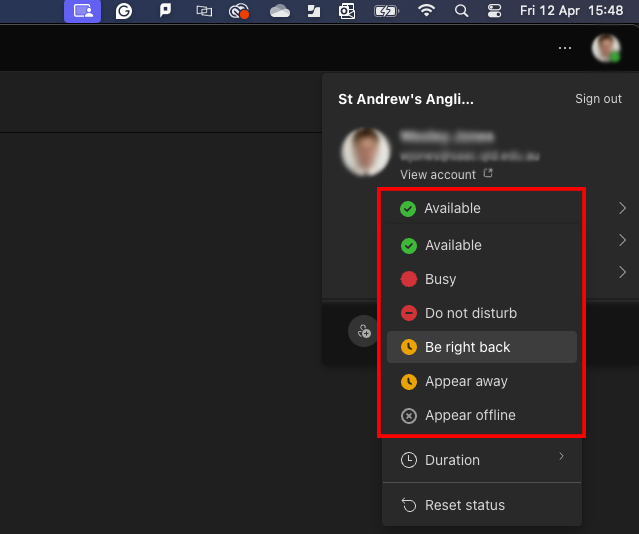
The Activity Status in Microsoft Teams shows your availability to others in the organisation. Your presence is updated in real-time, indicating whether you’re available, busy, or away. Below is a description of the presence states in Teams:

You are currently active and available to receive notifications and calls.

You are not free but can still receive notifications and calls.

This blocks all notifications until manually changed.

This appears when you haven’t interacted with your computer for more than 15 minutes. Moving your mouse or typing will revert it to the previous status.

This status is set manually to indicate that you’re away for a short time. You must manually change it back to another status.

When users are not logged in to any of their devices for a few minutes, they will appear as offline. This status can also be set manually.
Changing Your Activity Status #
To change your status in Teams, follow these steps:
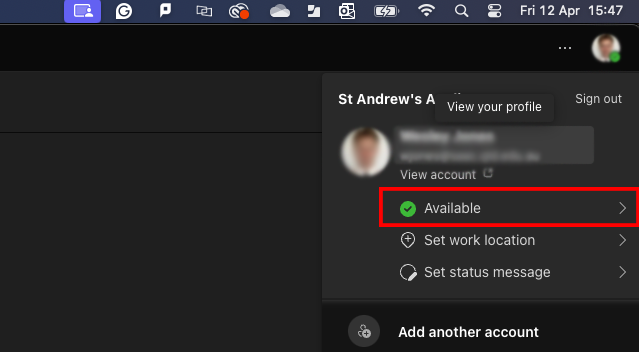
- Select your profile icon in the top-right corner of the Teams window.

- Select your current status.
- Choose the status you would like to display.